Technology

15 of the most FUTURISTIC Gadgets and Gifts you've ever seen! XGIMI Links:
US: Official Website:https://bit.ly/3cnms1B Amazon:https://amzn.to/30GXFU7
UK: Official Website:https://bit.ly/2YYkkKF Amazon:https://amzn.to/30AJVJX
All product links:
0:00 - Intro
0:21 - Atomi Showerhead (don't buy this 😂)
0:44 - LaserPecker - US: https://amzn.to/30LqXQV UK: https://amzn.to/30OUrhd
1:34 - XGIMI (Links Above)
2:39 - Thumby - Worldwide: https://bit.ly/2Z7B6XQ
3:19 - Power V4 - US: https://amzn.to/3nEnInH
4:14 - Mario Kart Live circuit - US: https://amzn.to/2Z6dK4O UK: https://amzn.to/3cDsNpG
5:18 - Zephyr Pro - Global: https://bit.ly/30MxfzN
5:58 - Nolii Battery System - Worldwide: https://nolii.com
6:49 - Oura Ring (3rd Gen) - Worldwide: https://ouraring.com
7:43 Heat Shrinking Tubing - US: https://amzn.to/30Pl9Gs UK: https://amzn.to/3nyGZH0
8:44 - Levitating Light - US: https://amzn.to/3DSUU0t UK: https://amzn.to/3FxZ3qS
9:23 - Tipsi Tray - US: https://amzn.to/3Fx6IWs UK: https://amzn.to/3CCCqzL
10:28 - Oladance Wearable Stereo - Worldwide: https://bit.ly/3HH24XB
11:49 - Mars Pro - US: https://amzn.to/3DH9mIO UK: https://amzn.to/2Zbhtyc
12:42 - Tri Screen 2 - US: https://amzn.to/3x7bqap UK: https://amzn.to/30N4iUU
13:20 - Expanscape Aurora 7 - Worldwide: https://expanscape.com
Follow XGIMI for updates and news!
* Instagram: https://www.instagram.com/xgimitech/
* YouTube: https://www.youtube.com/c/XGIMITech/f...
* Facebook: https://www.facebook.com/xgimi/
Subscribe for more content (IT'S FREE) : https://goo.gl/pLg6fE
It would make my day if you could also follow me on:
🌈 Instagram: https://goo.gl/OUqBBa
🐦 Twitter: https://goo.gl/EFhwqL
😊 Facebook: https://goo.gl/Aluzl1
Amazon Affiliate links:
Amazon US: https://goo.gl/3yS2aP
Amazon UK: https://goo.gl/gvrsGZ
My Filming Gear:
https://bit.ly/35CuxwI
Music is from Epidemic sound:
http://share.epidemicsound.com/pHDFT

See how you can save money on your Smart Home insurance with Hiro: https://gethiro.com/everythingsmarthome
In this video I take you through building my perfect smart home control panel with Home Assistant, I have wanted to do this for years and today is finally the day! I take you through my requirements for building my wall mounted smart home control panel, part selection and how I actually built it into my smart home, as well as some Home Assistant automations I have planned for it. I also show you the software for the wall panel too!
If you'd like to support me and future projects:
Patreon:
https://www.patreon.com/everythingsmarthome
Hardware used:
Tablet (UK): https://amzn.to/3kr0C14
Tablet (International): https://amzn.to/2UMVUSq
Buy Me a Coffee:
https://www.buymeacoffee.com/EverySmartHome
Written Article:
https://everythingsmarthome.co.uk
EVERYWHERE YOU CAN FIND ME:
Everything Smart Home Community Discord:
https://discord.everythingsmarthome.co.uk
Twitter: https://twitter.com/EverySmartHome (@EverySmartHome)
Instagram: https://www.instagram.com/EverythingSmartHome/
Facebook: https://www.facebook.com/every....thingsmarthomeoffici
#homeassistant #smarthome
________________________
Some of the links above are affiliate links, where I earn a small commission if you click on the link and purchase an item. You are not obligated to do so, but it does help fund these videos in hopes of bringing value to you!

Have you wanted to get started with Home Assistant? Well, this week's video is a simple guide on how to set up a Raspberry Pi 4 as your Home Assistant system. This should be an easy-to-follow guide.
Bonus: I also show you how to set up three Home Assistant add-ons to enhance your experience.
To access your local home assistant instance: http://homeassistant.local:8123
Feel free to use the timestamps to jump to the relevant section.
❓What future topics would you like me to cover??❓
▶ Buy Me A Beer 🍻: https://www.buymeacoffee.com/ThisSmartHouse
▶ Timestamps ⌚:
00:00:00 - Opening
00:00:09 - Logo
00:00:20 - Introduction
00:01:34 - Part 1: What is HA?
00:03:46 - Part #2: Getting Started
00:05:39 - Part 3: Flash SD
00:09:50 - Part 4: Setting up Home Assistant
00:11:32 - Part 5: Suggested Add-ons
00:12:42 - Part 5.1: Duck DNS
00:15:31 - Part 5.2: Let's Encrypt
00:17:36 - Part 5.3 - SAMBA
00:20:31 - Outro
▶ Links in Video 🔗:
(I use Rebrand.ly for my URL shortening)
Google Drive Backup Add-on - https://tshouse.link/gbackup
Local Home Assistant Instance: http://homeassistant.local:8123
▶ Product Links:
(When available, we use affiliate links and may earn a commission!)
Getting Started Home Assistant Gear (Kit.co): https://tshouse.link/kitha
My Main Home Automation Gear (Kit.co): https://tshouse.link/homekit
My Z-Wave Home Automation Gear (Kit.co): https://tshouse.link/zwave
▶ Get a One-Month Trial of Great Music for Creators (I use this on my photography channel): https://tshouse.link/sound
▶ Website: https://thissmart.house
#gettingstarted #homeassistant #raspberrypi

In this video we are covering 5 common mistakes I see people making when getting started with Home Assistant all the time and what you can do to fix them, to keep your Home Assistant install running perfectly!
If you'd like to support me and future projects:
Patreon:
https://www.patreon.com/everythingsmarthome
Hardware to run Home Assistant:
Raspberry Pi 4: https://amzn.to/2Dviwyh
Raspberry Pi 4 Bundle: https://bit.ly/31TpS6Z
Micro SD Card: https://amzn.to/3lqBk2v
Micro SD to USB Adapter: https://amzn.to/2GcAk1P
SSD's: https://amzn.to/2Pyq5dw
Home Assistant Blue: https://bit.ly/31RZM4s
Buy Me a Coffee:
https://www.buymeacoffee.com/EverySmartHome
Written Article:
https://everythingsmarthome.co.uk
EVERYWHERE YOU CAN FIND ME:
Everything Smart Home Community Discord:
https://discord.everythingsmarthome.co.uk
Twitter: https://twitter.com/EverySmartHome (@EverySmartHome)
Instagram: https://www.instagram.com/EverythingSmartHome/
Facebook: https://www.facebook.com/every....thingsmarthomeoffici
#homeassistant #smarthome
________________________
Some of the links above are affiliate links, where I earn a small commission if you click on the link and purchase an item. You are not obligated to do so, but it does help fund these videos in hopes of bringing value to you!

Home Assistant Beginners Guide: Installation, Addons, Integrations, Scripts, Scenes, and Automations
Home assistant is the most powerful home automation platform available with almost limitless possibilities. This video is designed to help you get your feet wet and learn your way around the basic configuration of home assistant including installation, addons, integrations, scripts, scenes, and automations.
Timestamp Bookmarks:
2:30 RaspberryPi Installation
4:02 Virtual Machine Installation
6:22 Initial Hass.io Setup
8:55 Essential Addons
11:07 Adding Devices to HA
15:03 Scripts and Automations
Links:
[Hassio Raspberry Pi Installation]
Hassio Install Files: https://www.home-assistant.io/hassio/installation/
RaspberryPi Wi-Fi Setup Template: https://github.com/home-assist....ant/hassos/blob/dev/
Recommended RasPi Version: https://amzn.to/30ZIKjE
[Hassio Virtual Machine Installation]
VirtualBox Install Files: https://www.virtualbox.org/wiki/Downloads
Hassio VMDK Download*: https://www.home-assistant.io/hassio/installation/
*VMDK Comes ZIPPED as a .gz file, you may need a program to unzip it. I recommend 7zip: https://www.7-zip.org/
Install VirtualBox Service (start on boot): https://youtu.be/vnie-PJ87Eg?t=644
[YouTube Home Assistant Channels]
JuanMTech: https://www.youtube.com/user/Jfelipe83M
BurnsHA: https://www.youtube.com/channe....l/UCSKQutOXuNLvFetrK
DigiblurDIY: https://www.youtube.com/channe....l/UC5ZdPKE2ckcBhljTc
[Facebook Groups]
The Hook Up: https://www.facebook.com/group....s/473812443269387/?r
DrZzs: https://www.facebook.com/group....s/1969622823351838/?
Visit my website: http://www.TheSmartHomeHookUp.com
Follow me on Twitter: @TheHookUp1
Support my channel:
Patreon: https://www.patreon.com/thehookup
Music by www.BenSound.com

What’s the best smart home hub for 2021? And what’s going on lately with SmartThings anyways?! I’ve tested many of the best smart home hubs, and will compare their pros and cons to give you all the details you need for your smart home.
Article with more info: https://bit.ly/3ba9o0p
Links (affiliate):
SmartThings: https://amzn.to/3n47Ffl
Hubitat: https://amzn.to/383xJTv
Home Assistant Blue: https://www.home-assistant.io/blue/
Raspberry Pi: https://amzn.to/2X4MSxv
HomePod mini: https://bestbuy.7tiv.net/94A44
HomeSeer: https://amzn.to/3b1P0OJ
Vera: https://amzn.to/38YVLy3
Amazon Echo 4: https://amzn.to/3pEqszm
Nest Hub Max: https://homedepot.sjv.io/5rDG3
SUBSCRIBE so you don’t miss more smart home videos: https://www.youtube.com/c/Smar....tHomeSolver?sub_conf
MY SETUP & GEAR
See the list of everything I use in my smart home and other favorites:
https://www.amazon.com/shop/smarthomesolver
0:00 Intro
0:45 SmartThings
3:11 Hubitat
5:37 Home Assistant
7:59 HomeKit
9:14 HomeSeer
9:54 Other Hubs
10:34 What I’m Using + Why
11:53 Side Fling
DISCOVER MORE
Article with more info: https://bit.ly/3ba9o0p
Amazon Echo 4 review + hub info: https://youtu.be/urI_xvmd4Pc
Homepod mini review: https://youtu.be/Q1XcmHRtQzc
5 Best Smart Home Hubs (previous comparison): https://youtu.be/9YIc0-YVYZM
When and How to Use a Hub: https://youtu.be/6UVskU-8_zY
Hubitat review: https://youtu.be/G7LGRFdnnOk
HATS
Get a Smart Home Solver hat: https://bit.ly/375crCR
FOLLOW ME
Twitter: https://twitter.com/SmartHomeSolver
Instagram: https://www.instagram.com/smarthomesolver/
----------
MUSIC
Doctor Momentum by Slynk
The End by EVA
https://open.spotify.com/artis....t/6UIs5b0zSXztIW5GHk
Disclaimer: Smart Home Solver was sent some of the products in this video for previous unbiased reviews. As always, our opinions are 100% our own and not influenced.

Is a Google smart home worth it? I’ll test some of the newer Google Assistant features and automation options on the Pixel 6 Pro. This will help you see what it’s like to have a Google smart home—the good AND bad.
LINKS (affiliate):
Nest Mini: https://homedepot.sjv.io/QDvXx
Nest Hub Max: https://homedepot.sjv.io/5rDG3
Pixel 6 Pro: https://amzn.to/3ExHl6v
My shirt in this video: https://threadless.78cfvm.net/qnZ9yO
DISCOVER MORE
Alexa vs Google Showdown: https://youtu.be/_tXSOFCpbvI
10 Google Features: https://youtu.be/Akt5Rjv2D6k
15 Alexa Routines: https://youtu.be/BJJMKsowQSg
FOLLOW ME
Subscribe: https://bit.ly/3joO1dZ
Twitter: https://twitter.com/SmartHomeSolver
Instagram: https://www.instagram.com/smarthomesolver/
0:00 Intro
0:23 Android phone + smart home
2:35 Automations: the good
4:35 Automations: the bad
6:26 Speakers and displays
8:06 So is Google a lost cause?
9:26 Hey Poodle
----------
MUSIC
Dr. Momentum by Slynk
https://youtu.be/1cfXxpOvnt0
The End by EVA
https://open.spotify.com/artis....t/6UIs5b0zSXztIW5GHk

Make your house smarter with these home automation ideas! Follow me on my smart home tour through a typical day filled with automation. I use Alexa and SmartThings for most of these ideas, so you can easily copy them for your own house.
FULL article with how to set all of this up: https://smarthomesolver.com/re....views/smart-home-aut
Reddit home automation megathread: https://www.reddit.com/r/homea....utomation/comments/9
LINKS (affiliate):
Sengled smart light bulb: https://amzn.to/2ZihBKW
LIFX bulb: https://amzn.to/2DtiTpL
SmartThings hub: https://amzn.to/2NSfg2F
SmartThings motion sensor: https://amzn.to/2KTgh8w
SmartThings multipurpose sensor: https://amzn.to/2ybuPtd
Echo Dot v3: https://amzn.to/2ZoXPg3
Rachio sprinkler controller: https://amzn.to/328wAEx
LIFX Z light strips: https://amzn.to/2ONRhPm
BOND fan controller: https://amzn.to/2ZqGteT
Bose SoundTouch 10: https://amzn.to/2KUQHA6
SmartDry (Dryer alert): https://amzn.to/2HoIRg4
Ring 2: https://amzn.to/2ZdqaGZ
Brilliant smart home hub: https://www.brilliant.tech/pro....ducts/brilliant-cont
Roborock S5 robotic vacuum: https://amzn.to/2t6OWWK
Water leak sensor: https://amzn.to/2ZphhWc
Wyze Cam v2: https://amzn.to/2LJrg65
Wyze Sense and Wyze Cam Bundle: https://amzn.to/2LIo8rd
Nest thermostat: https://amzn.to/2JXSqoh
MyQ garage door opener: https://amzn.to/31WqlmW
Gryphon smart home router: https://amzn.to/32086x0
Front Porch - Kasa Light Switch: https://amzn.to/2SHDUmS
Hue: https://amzn.to/2KRWVCO
Light strips behind TV: https://amzn.to/2YYnjNc
Harmony hub: https://amzn.to/340uqbt
SmartThings outlet plugged into TV: https://amzn.to/2KVQLQf
Outdoor string lights: https://amzn.to/2T3dFql
Outdoor solar lights: https://amzn.to/2yg3g20
Motion lights in closet: https://amzn.to/2Hq2tQW
Schlage Connect door lock: https://amzn.to/2QfPRim
Under bed light strips: https://amzn.to/2YRW8DK
Bathroom light strips: https://amzn.to/2DsHCd3
Curious how much it all costs? Watch this: https://youtu.be/hidplm_N880
SUBSCRIBE for more smart home videos with these ideas: https://www.youtube.com/c/Smar....tHomeSolver?sub_conf
MY SET UP & GEAR
See the list of everything I use in my smart home and other favorites:
https://www.amazon.com/shop/smarthomesolver
DISCOVER MORE
Videos -
20 Smart Lighting Ideas: https://youtu.be/4o8PPpSN23Y
SmartThings Ideas: https://youtu.be/mSoN685l_i4
6 Light Strip Ideas - Ultimate Light Strip Setup: https://youtu.be/7soFzqvIxQ4
Motion Activated Light Strips: https://youtu.be/toNVmPoyAfk
My Smart Office Setup: https://youtu.be/QM8_hBYBY4I
Articles -
30 Basic Home Automation Ideas for Beginners: https://smarthomesolver.com/re....views/30-home-automa
My Complete Smart Home Setup: https://smarthomesolver.com/re....views/complete-smart
6 Incredible LED Light Strip Ideas: https://smarthomesolver.com/re....views/led-light-stri
25 Alexa Routine Ideas: https://smarthomesolver.com/re....views/alexa-routine-
5 Best Smart Home Hubs: https://smarthomesolver.com/re....views/5-best-smart-h
----------
Songs titled Terminant and B1-66ER by Nihilore and used under Creative Commons. Check out his website here: http://www.nihilore.com/
Disclaimer: Smart Home Solver was sent Wyze Cam, Nest, and several other products featured in this video for previous unbiased reviews. Other products were purchased with our own money. As always, our opinions are 100% our own and not influenced.
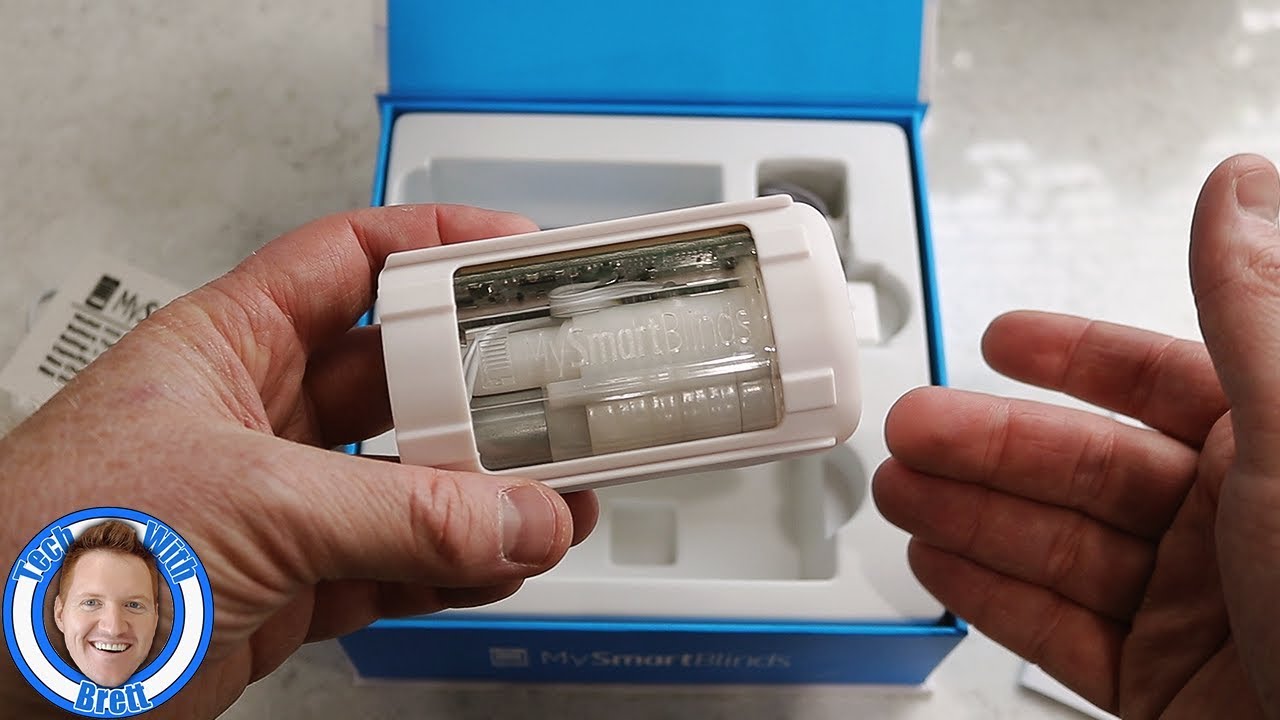
Are you looking to add smart blinds in your home? Let me introduce you to the MySmartBlinds Automation Kit!
With the Automation Kit you are able to add smart functionality to your existing 2" - 2 1/2" Horizontal blinds. This Kit is easy to add on your own and are installed in no time! You then are able to tilt the blind with your smartphone or with a Smart Switch remote and soon with voice control with Alexa and Google Home. These blinds are available for outside or inside mount windows and will work on a blind that is 72" x 72".
MySmartBlinds Automation Kit: https://geni.us/V2HfFrB
MySmartBlinds Bridge: https://geni.us/uBAqt0
MySmartBlinds With SmartLock Review: https://youtu.be/t7kBpHFrark
MySmartBlinds Bridge Tutorial: https://youtu.be/QIkd4iJFDPg
Learn more: https://www.mysmartblinds.com/
SUBSCRIBE here, it's FREE! https://goo.gl/vqO8kP
Check out these products I use and have reviewed: https://www.amazon.com/shop/techwithbrett
Thank you MySmartBlinds for over this product to review.
Tech With Brett is a participant in the Amazon Services LLC Associates Program, an affiliate advertising program designed to provide a means for sites to earn advertising fees by advertising and linking to amazon.com.
Connect with me!
Web: https://techwithbrett.com
Twitter: https://twitter.com/techwithbrett
Instagram: http://instagram.com/techwithbrett
Facebook: https://www.facebook.com/TechWithBrett/
#TechWithBrett #MySmartBlinds #AutomationKit #SmartSwitch #SolarPanel #SmartBlinds #HomeAutomation

Automation is finally coming into fashion, with sewing robots that can produce clothes faster than human hands. In this episode of Moving Upstream, WSJ’s Jason Bellini takes a look at the latest technology and what it means for the 60 million people who work in the garment industry.
Don’t miss a WSJ video, subscribe here: http://bit.ly/14Q81Xy
More from the Wall Street Journal:
Visit WSJ.com: http://www.wsj.com
Visit the WSJ Video Center: https://wsj.com/video
On Facebook: https://www.facebook.com/pg/wsj/videos/
On Twitter: https://twitter.com/WSJ
On Snapchat: https://on.wsj.com/2ratjSM

At Dorner, we're Transforming Conveyor Automation by providing cutting edge precision conveyance solutions designed to increase your efficiency and productivity.
With a complete line of industrial belted, modular belt, and flexible chain conveyors, as well as the industries widest variety of sanitary conveyor designs, we have a conveyor for almost every application.
Take a look at our new video to find out how Dorner Conveyors can improve your process.
https://www.dornerconveyors.co....m/transforming-conve
🔥 Enrol for FREE RPA Course & Get your Completion Certificate: https://www.simplilearn.com/learn-rpa-basics-skillup?utm_campaign=Skillup-RPA&utm_medium=DescriptionFirstFold&utm_source=youtube
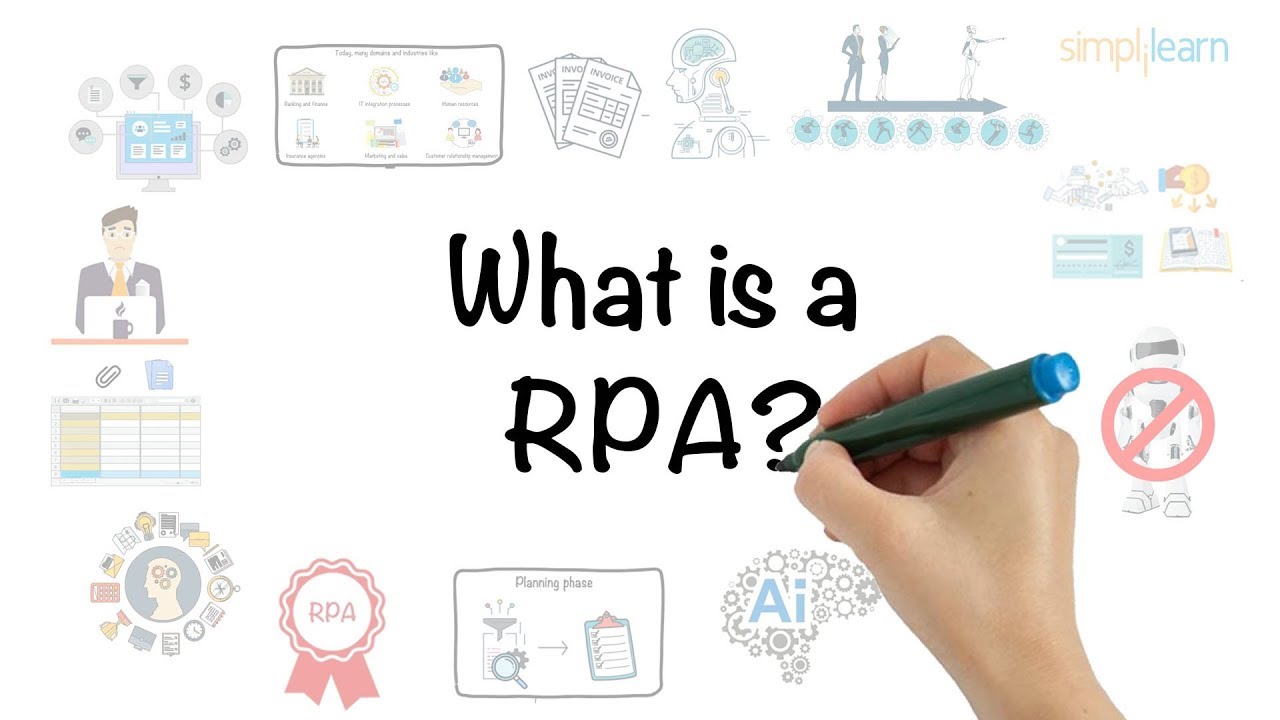
This video, titled "What is RPA?" gives a basic overview of RPA and its ideas. We learn about what RPA is, why it is being widely used across industries, how it works, the results of using RPA, and finally, its growth estimates over the last few years. So, let's jump right in.
0:00 - Start
0:50 - What is RPA?
1:51 - Working of RPA
2:46 - Advantages of RPA
3:29 - Applications of RPA
3:42 - Future of RPA
4:23 - Quiz
Start learning today's most in-demand skills for FREE. Visit us at https://www.simplilearn.com/skillup-free-online-courses?utm_campaign=RPA&utm_medium=Description&utm_source=youtube
Choose over 300 in-demand skills and get access to 1000+ hours of video content for FREE in various technologies like Data Science, Cybersecurity, Project Management & Leadership, Digital Marketing, and much more.
Don't forget to take the quiz at 04:24! Comment below what you think is the right answer, to be one of the 3 lucky winners who can win Amazon vouchers worth INR 500 or $10! (Depending on your location). What are you waiting for? Winners will be announced on May 27th, 2020.
✅Subscribe to our Channel to learn more about the top Technologies: https://bit.ly/2VT4WtH
⏩ Check out the RPA training videos: https://bit.ly/2Sy2zeO
#RPA #RoboticProcessAutomation #RPADeveloper #WhatIsRPA? #RPAExplained #RPATutorialForBeginners #Simplilearn #WorkingofRPA #RPAtools #RPAApplications
What is RPA?
Robotic Process Automation (RPA) is the use of software with Artificial Intelligence and Machine Learning capabilities to handle high-volume, repetitive tasks that previously required humans to perform. Some of these tasks include addressing queries, making calculations, maintenance of records, and performing transactions.
If you want to expand your expertise in advanced intelligent applications, then this Introduction to Robotic Process Automation (RPA) course will put you on the fast track. RPA is one of the hottest and fastest-growing technologies for improving real-time business operations and processes. This course will give you an overview of RPA concepts, the value-add it brings with relevant business use cases and tools understanding.
What are the benefits of this course?
Robotic Process Automation (RPA) is an advanced technology that automates huge quantities of redundant tasks by applying artificial intelligence (AI). RPA can be used for processing transactions, manipulating data, triggering responses and communicating with other digital systems. RPA has applications in a plethora of industries including insurance claims processing, invoice processing, customer feedback analysis, onboarding of employees, HR operations, and much more. More on the RPA market:
- The global market for RPA software and services is expected to grow to $1.2 billion by 2021 at a compound annual growth rate of 36 per cent.
- One wine producer increased its order accuracy from 98% to 99.7% while reducing costs There are 3000+ RPA job postings in India and the US.
What are the course objectives?
The primary objective of this Introduction to RPA training course is to give you a glimpse into the bright and exciting future of Robotic Process Automation and to give you an overview of the fundamental methodologies and tools that will help you employ RPA on the job. You’ll learn the key RPA tools and workflows used in intelligent automation, steps for implementing RPA in your enterprise and case studies that will provide innovative best practices.
Upon successful completion of our Introduction to Robotics Process Automation online training course, you will gain a fair understanding of RPA and related business applications. By the end of the course, you will be able to understand-
1. RPA and it's business applications
2. The impact that RPA creates with significant ROI
3. Various tools available in the market and their right fit
4. Organization and management of a real-life workflow automation project
Who should take this course?
Simplilearn’s Introduction to Robotic Process Automation course is best suited for:
1. CXOs
2. Team Leads
3. Business Analysts
4. Solution Architects
👉Learn more at: https://www.simplilearn.com/robotic-process-automation-using-uipath-training-course?utm_campaign=RPA&utm_medium=Description&utm_source=youtube
For more information about Simplilearn courses, visit:
- Facebook: https://www.facebook.com/Simplilearn
- Twitter: https://twitter.com/simplilearn
- LinkedIn: https://www.linkedin.com/company/simplilearn/
- Website: https://www.simplilearn.com
Get the Android app: http://bit.ly/1WlVo4u
Get the iOS app: http://apple.co/1HIO5J0

🔵 Edureka RPA Training (𝐔𝐬𝐞 𝐂𝐨𝐝𝐞: 𝐘𝐎𝐔𝐓𝐔𝐁𝐄𝟐𝟎) : https://www.edureka.co/robotic....-process-automation-
This Edureka Robotic Process Automation Full Course video will help you understand and learn RPA in detail. This RPA Tutorial is ideal for both beginners as well as professionals who want to master RPA tools such as UiPath & Automation Anywhere. Below are the topics covered in this RPA tutorial for beginners video:
00:00 Agenda
1:56 Introduction to RPA
2:26 Why RPA?
8:46 What is RPA?
10:16 RPA Tools
10:26 RPA Lifecycle
11:01 Discovery Phase
14:36 Solution Design Phase
17:35 Development Phase
18:16 UAT
18:51 Deployment Phase
19:21 Execute Bots
22:31 Introduction to UiPath
23:01 UiPath Studio
23:11 UiPath Installation
25:36 UiPath Studio Projects
29:46 UiPath Studio Ribbon Components
40:01 UiPath Studio Activity Pane Components
42:41 UIPath Studio Properties Pane
43:16 UiPath Studio Output Pane
49:46 UiPath RPA Architecture
50:11 UiPath Platform Components
50:21 UiPath Studio
52:21 UiPath Orchestrator
55:21 UiPath Architecture
58:11 Variables, Data Types & Activities in UiPath
1:03:11 Types of Variables
1:08:56 Data Types
1:10:16 Activities
1:12:16 Message Box
1:15:51 Write CSV Activity
1:18:56 If Activity
1:21:51 For Each Activity
1:24:41 While Activity
1:27:31 Do While Activity
1:29:06 Switch Activity
1:31:26 Automations in UiPath
1:31:31 Why Excel Automation?
1:32:21 Installing Excel Activities in UiPath Studio
1:33:46 Demo; Automating the Filling of a Form
1:48:06 UiPath Selectors
1:48:51 What are Selectors?
1:51:16 Why do we need Selectors in UiPAth?
1:53:26 Demo: Selectors in UiPath
2:21:51 UiPath Web Automation
2:24:01 Hands-on: Web Scraping of Google Contacts
2:24:01 Hands-on: Extracting Data From E-Commerce Website
2:46:26 UiPath PDF Automation
2:48:01 Types of PDF Activities
2:49:43 Demo: Extracting Large Texts
3:03:08 Demo: Extracting Specific Element
3:11:58 UiPath Email Automation
3:15:03 Demo: UiPath Email Automation
3:45:53 UiPath Citrix Automation
3:46:18 Automating Virtual Machine
3:48:53 Why Citrix Automation?
3:49:53 Hands-on: Simple Desktop Application
3:59:18 Debugging & Error Handling in UiPath
3:59:43 Debugging in UiPath
4:17:33 Exception Handling in UiPath
4:22:08 UiPath Tips & Tricks
4:29:28 Orchestrator in UiPath
4:33:38 UiPath Orchestrator Community Edition
5:06:23 UiPath ReFramework
5:06:38 Why Re-Framework?
5:08:48 What is Re-Framework?
5:12:38 How to use Re-Framework?
5:14:43 Re-Framework Architecture
5:18:11 INIT State
5:32:01 Get Transaction Data State
5:39:13 Process Transaction State
5:54:28 End Process State
5:58:18 RPA & UiPath Interview Questions
7:11:50 Introduction to Automation Anywhere
7:11:55 What is Automation Anywhere?
7:12:55 Automation Anywhere Architecture
7:15:30 Products of Automation Anywhere
7:23:50 Industries Using Automation Anywhere
7:28:05 Automation Anywhere Installation
7:44:50 Install & Setup Client
7:49:00 Control Room & Bots
7:49:35 Automation Anywhere Architecture
7:52:40 Control Room Components
8:02:10 Hands-on
8:06:30 Automation Anywhere Bots
8:08:00 Types of Automation Anywhere Bots
8:08:20 Task Bots
8:10:50 Meta Bots
8:25:20 IQ Bots
8:27:08 Products of Automation Anywhere
8:28:13 Automation Anywhere Examples
8:28:53 Windows Action
8:33:08 Mouse Clicks
8:35:58 String Operations
8:41:23 Files & Folders
8:44:38 Web Recorders
8:49:34 OCR
8:51:49 Key Strokes
8:53:14 REST Web Services
8:55:39 Excel Automation
9:04:14 PDF Automation
9:15:24 Automation Anywhere Interview Questions
9:17:04 Basic Questions
9:33:19 Tool-based Questions
9:57:04 Scenario-based Questions
------------------------
🔵 RPA Developer Master Program: https://bit.ly/2YNiR5H
-------------------------
📌𝐓𝐞𝐥𝐞𝐠𝐫𝐚𝐦: https://t.me/edurekaupdates
📌𝐓𝐰𝐢𝐭𝐭𝐞𝐫: https://twitter.com/edurekain
📌𝐋𝐢𝐧𝐤𝐞𝐝𝐈𝐧: https://www.linkedin.com/company/edureka
📌𝐈𝐧𝐬𝐭𝐚𝐠𝐫𝐚𝐦: https://www.instagram.com/edureka_learning/
📌𝐅𝐚𝐜𝐞𝐛𝐨𝐨𝐤: https://www.facebook.com/edurekaIN/
📌𝐒𝐥𝐢𝐝𝐞𝐒𝐡𝐚𝐫𝐞: https://www.slideshare.net/EdurekaIN
📌𝐂𝐚𝐬𝐭𝐛𝐨𝐱: https://castbox.fm/networks/505?country=IN
📌𝐌𝐞𝐞𝐭𝐮𝐩: https://www.meetup.com/edureka/
📌𝐂𝐨𝐦𝐦𝐮𝐧𝐢𝐭𝐲: https://www.edureka.co/community/
--------------------------
Got a question on the topic? Please share it in the comment section below and our experts will answer it for you.
For more information, please write back to us at sales@edureka.in or call us at IND: 9606058406 / US: 18338555775 (toll-free).

Time to show off YOUR automations! You all sent me some very impressive home automation ideas that I’m so excited to show you.
SUBMIT YOUR IDEAS
Want me to feature your automation idea in a future video? Here’s how:
1. Take a horizontal video showing the automation in action and explaining it.
Videos that are well-lit and not extremely shaky are more likely to be used.
2. Upload the video to Google Drive, YouTube, or another platform.
Make sure we can view and download it from the link you send.
3. In an email, send us a link to the video.
You can also write down more info about how you set up the automation, what tech you’re using, your name for a shoutout, etc.
4. Email to: smarthomesolver@gmail.com
This email is only for submitting your automation ideas and setups. All other emails will not receive a response.
Big thanks to today’s submissions: Thorstann, Lisakki, Andrew, Jacob, Jaren, George, Sonny, Josiah, Tim, and Praul Hubert
LINKS (affiliate):
--Kitchen vibration lights--
WebCoRE piston import code: htmw
Hue motion sensor: https://amzn.to/3iIuV38
SmartThings multipurpose sensor: https://amzn.to/3lmu4ab
IKEA lights: https://www.ikea.com/us/en/p/m....yrvarv-led-light-str
IKEA Tradfri driver: https://www.ikea.com/us/en/p/t....radfri-driver-for-wi
--3D printer alert--
Iisakki Kaaretkoski YT channel: https://youtu.be/FX2sOlrtTkI
Ender 3 Pro printer: https://amzn.to/3Bq4Eh9
Octoprint: https://www.home-assistant.io/....integrations/octopri
Assistant Relay GitHub: https://github.com/greghesp/assistant-relay
--NFC tag cassette-
Home Assistant Blueprint: https://community.home-assista....nt.io/t/start-music-
--Weather alerts--
Tornado alerts in Home Assistant: https://community.home-assista....nt.io/t/severe-weath
Github: https://gist.github.com/finity....69x2/2b8336429008e9e
--Automated sliding door--
Sliding door motor: https://amzn.to/2YBtmgv (Canada link, can’t find US but you might be able to)
WiFi Relay for automated doors: https://amzn.to/3uRAtNq
Pressure sensor for automated doors: https://amzn.to/2ZZ4K1u
--Game controller automation--
Plugin to get PC working with HomeBridge: https://github.com/AlexGustafsson/homebridge-wol
TV control plugin: https://github.com/tavicu/homebridge-samsung-tizen
Xiaomi Mi door and window sensor: https://www.mi.com/global/prod....uct/mi-window-and-do
--Shower light timer--
LIFX bulbs: https://amzn.to/2Yy2Nsl
Hue dimmer: https://amzn.to/3BsmTTf
Flow: https://drive.google.com/file/....d/1ibogx1xv95JIhoK8J
--Goodbye Ring automation--
Josiah’s photography: https://www.jsweiss.com
Alexa routines screenshot: https://drive.google.com/drive..../folders/1PoRz02MPrb
Ring security system: https://amzn.to/2YAmUq4
iRobot Roomba E5: https://amzn.to/3Dn7kNb
Ecobee 3 lite: https://amzn.to/3iJiVhG
--Smart security and gate--
Gate opener: https://www.hiviewproduct.com/....product/52394-38235/
Nexlux light strips on stair railing: https://amzn.to/2WV9ggv
Fibaro panic button: https://amzn.to/3uVope9
--Praul Hubert--
Subscribe to Paul Hibbert! https://www.youtube.com/c/PaulHibbert
Flic button: https://amzn.to/30a7Pfp
DISCOVER MORE
5 Insane Home Automation Ideas from Reddit: https://youtu.be/CNi8mVqP1sE
10 Next Level Automations (smart apartment): https://youtu.be/G_bsShHvmj8
25 Home Automation Ideas vol. 2: https://youtu.be/jDaRPsvvcz4
FOLLOW ME
Subscribe: https://bit.ly/3joO1dZ
Twitter: https://twitter.com/SmartHomeSolver
Instagram: https://www.instagram.com/smarthomesolver/
0:00 Intro
0:24 Kitchen vibration lights
1:36 3D printer alert
2:44 NFC cassette tapes
3:38 Tornado alert
4:26 Automated sliding door
5:31 Game controller
6:12 Bathroom light timer
7:06 Goodbye automation
7:52 Security gate and automations
9:12 Praul Hubert
----------
MUSIC
The End by EVA
https://open.spotify.com/artis....t/6UIs5b0zSXztIW5GHk
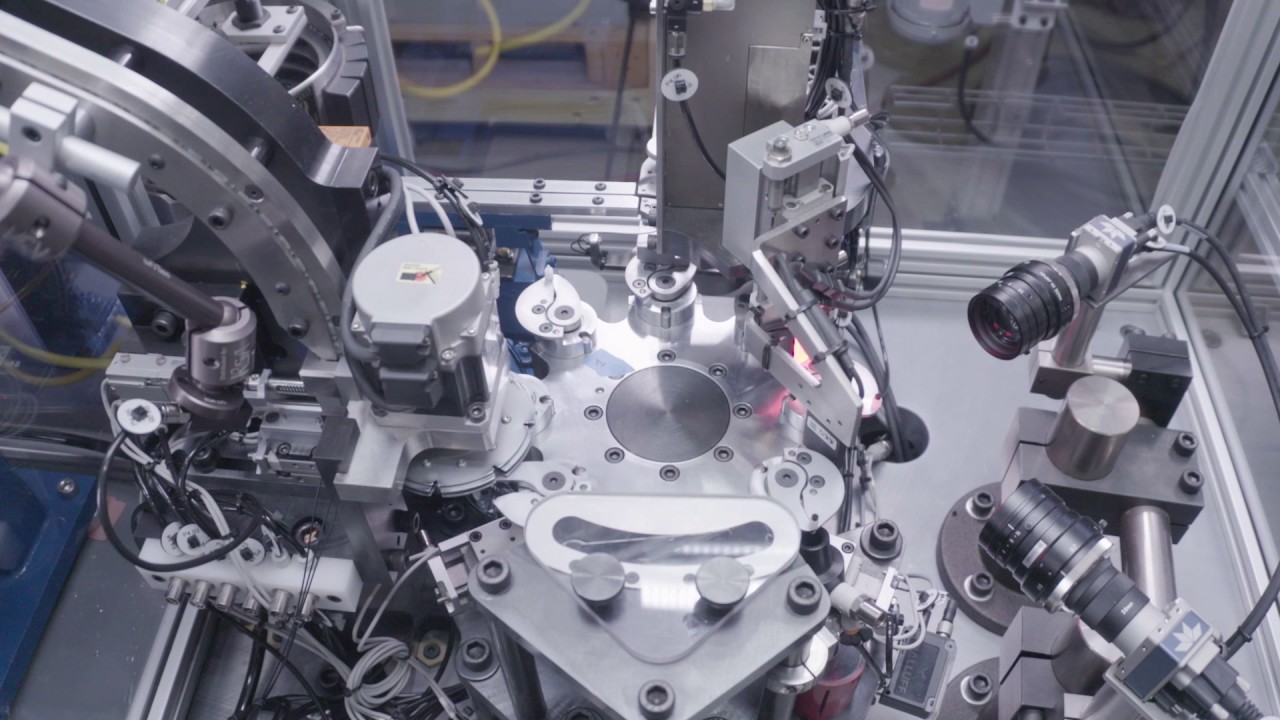
This machine was designed and engineered by Matrix Design to assemble a valve body and rubber tip. Assembly takes place around a dial using cam operated jaws that grip the valve body. A vibratory bowl feeds the valve bodies into a gravity track while a servo driven small dial is used for feeding the valve bodies to the main dial. Air tracks are used to move the rubber tip and a servo driven singulating mechanism grabs one unit at a time to insert on top of the valve body using thrust and rotation. After the parts are assembled, a vision camera inspects height and concentricity. If the parts are misassembled and do not meet the programmed critical dimension, it gets rejected through a vacuum. If the assembled part passes inspection, it gets ejected down a chute and into a waiting container on a conveyor belt at the bottom of the assembly machine.
For more information, click or call!
www.matrixdesignllc.com | info@matrixdesignllc.com | 847.841.8260

Welcome to the video about python automation for beginners. We will try the most basic thing for web automation using python script. We will use selenium and Chrome web driver to perform a simple task. Surely this is just a basic and fun introduction for web automation in python.
Let me know in comments if you want more such kind of videos.
and I am sure there will be a comment that says, video starts at x.xx
Funny!
Link to my programming Video Library:
https://courses.LearnCodeOnline.in
Pick best UI color for your projects:
https://UIColorPicker.com
Desktop: https://amzn.to/2GZ0C46
Laptop that I use: https://amzn.to/2Goui9Q
Wallpaper: https://imgur.com/a/FYHfk
Facebook: https://www.facebook.com/HiteshChoudharyPage
Instagram: https://instagram.com/hiteshchoudharyofficial
homepage: http://www.hiteshChoudhary.com
Download LearnCodeOnline.in app from Google play store and Apple App store
https://play.google.com/store/....apps/details?id=in.l
Disclaimer:
It doesn't feel good to have a disclaimer in every video but this is how the world is right now.
All videos are for educational purpose and use them wisely. Any video may have a slight mistake, please take decisions based on your research. This video is not forcing anything on you.
All Amazon links are affiliate links (If any).

Start listening with a 30-day Audible trial. Choose 1 audiobook and unlimited monthly Audible Originals absolutely free. Visit http://audible.com/smarthomesolver or text smarthomesolver to 500-500. Thank you to Audible for sponsoring!
Need home automation ideas? Of course you do! I’ll show you 25 MORE automation ideas. Follow me through one day and I’ll give you ideas to implement in your smart home. I’ll move through the ideas quickly, so if you want to see how I set them up, then click below.
How I set everything up: https://smarthomesolver.com/re....views/25-smart-home-
LINKS in order (affiliate):
LIFX Z light strips for sunrise: https://amzn.to/2Py5zq5
Corner chanel cover for LIFX Z light strips: https://amzn.to/3j71QMW
Withings bed pressure sensor: https://amzn.to/3mSISM6
Echo Dot: https://amzn.to/2G0O8N8
Window sensor: https://amzn.to/2FXh3ln
Ecobee thermostat: https://amzn.to/33ZnE6D
NFC tags: https://amzn.to/3j2ukXY
Light strips on door frame: https://amzn.to/2Pzq5GJ
Button “doorbell” for office: https://amzn.to/2EA4gVe
Button on desk: https://www.ikea.com/us/en/p/t....radfri-remote-contro
It's a Zigbee button and can connect directly with SmartThings
Switchbot: https://amzn.to/306eww4
Switchbot hub: https://amzn.to/3mUZ5Ri
Standing desk: https://www.fully.com/standing....-desks/jarvis/jarvis
Closet light strips: https://amzn.to/2I3nwZr
Channel cover: https://amzn.to/2zeTYaA
Closet Wyze contact sensor: https://wyze.com/wyze-sense.html
SmartThings hub: https://amzn.to/363QRjJ
Ring alarm: https://amzn.to/3cvxtNJ
Roborock S6 MaxV vacuum: https://amzn.to/33XLEah
Eufy camera with voice recording: https://amzn.to/32XwzGD
MyQ Garage opener: https://amzn.to/36hFdlv
Light switch with LED notification: https://inovelli.com/red-serie....s-dimmer-switch-z-wa
Eufy 2K doorbell: https://amzn.to/2RTesLC
Smart outlet for washing machine: https://amzn.to/3hXpOJf
Smart bulbs in office: https://amzn.to/3j8ngZV
Ambient light sensor: https://amzn.to/345JGFb
Robot toy cleaner: https://www.kickstarter.com/pr....ojects/ximpatico/nab
Chipolo Bluetooth remote tracker: https://amzn.to/3mP3Awq
Hue Sync box: https://bit.ly/2XIL6DW
Hue Sync lights: https://bit.ly/2VioN6l light strips: https://bit.ly/3iN9KL4
Light strips under cabinets: https://amzn.to/37f1OfT
Light strips plugged into a smart outlet.
Motion sensor in kitchen: https://www.ikea.com/us/en/p/t....radfri-wireless-moti
TV smart outlet: https://amzn.to/3hXpOJf
SUBSCRIBE so you don’t miss more smart home videos: https://www.youtube.com/c/Smar....tHomeSolver?sub_conf
MY SETUP & GEAR
See the list of everything I use in my smart home and other favorites:
https://www.amazon.com/shop/smarthomesolver
0:00 Intro
0:27 Morning routine
1:29 Office
3:01 Securely leaving
3:57 Why you should try Audible
4:53 Afternoon automations
5:59 TV and lighting
7:00 Evening shut down
8:06 Completely normal walk
DISCOVER MORE
How I set up everything in this video: https://smarthomesolver.com/re....views/25-smart-home-
25 Automation Ideas volume 1: https://youtu.be/F-mEA5RN_yo
10 SmartThings ideas: https://youtu.be/HDdwLi68N2E
20 Smart Lighting Ideas: https://youtu.be/4o8PPpSN23Y
HATS
Get a Smart Home Solver hat: https://bit.ly/375crCR
FOLLOW ME
Twitter: https://twitter.com/SmartHomeSolver
Instagram: https://www.instagram.com/smarthomesolver/
----------
MUSIC
Terminant by Nihilore
http://www.nihilore.com/latest....-tracks/2018/10/13/t
The End by EVA
https://open.spotify.com/artis....t/6UIs5b0zSXztIW5GHk
Disclaimer: Smart Home Solver was sent some products in this video for previous unbiased reviews. As always, our opinions are 100% our own and not influenced. This video is sponsored by Audible.

Futurologists have been predicting the automation armageddon -- robots replacing human workers -- for decades. Has the future finally arrived? Economics correspondent Paul Solman visits Silicon Valley to talk with leading tech thinkers and computer scientists about whether humanity is at a tipping point.

SYNOPSIS: From lab-grown organs to tissue engineering, regenerative medicine holds the potential to deliver eternal life. How close are we to this new future of human health? Developmental biologists, biomedical engineers, regenerative scientists, and physicians for a riveting exploration of the current and future state of regenerative medicine.
PARTICIPANTS: Dany Spencer Adams, Stephen Badylak, Jonathan Butcher, Doris Taylor
MODERATOR: Emily Senay
Original program date: JUNE 1, 2017
WATCH THE TRAILER: https://youtu.be/XeqkytBCaKU
WATCH THE LIVE Q&A: https://youtu.be/e0vKOYQUmgg
FULL PROGRAM DESCRIPTION: Synthetic blood mass-produced to meet supply shortages. Livers and kidneys “bioprinted” on demand. Missing fingers and toes re-grown with a jolt of bioelectricity. Regenerative medicine promises to do more than just treat disease, injuries, or congenital conditions. It holds the potential to rejuvenate, heal, or completely replace damaged tissue and organs. If successful, regenerative medicine will have immense impact on how we care for the injured, sick, and aging — and how we think about death. This program will explore mind-boggling medical advances as well as the societal and economic implications of a future in which everybody may truly be forever young.
MORE INFO ABOUT THE PROGRAM AND PARTICIPANTS: https://www.worldsciencefestiv....al.com/programs/wire
This program is part of the Big Ideas Series, made possible with support from the John Templeton Foundation.
- Subscribe to our YouTube Channel for all the latest from WSF
- Visit our Website: http://www.worldsciencefestival.com/
- Like us on Facebook: https://www.facebook.com/worldsciencefestival/
- Follow us on Twitter: https://twitter.com/WorldSciFest
TOPICS:
- Forever Young Introduction 00:00
- Participant Introductions 3:55
- What is being worked on in the field of human regeneration? 5:35
- How do you make a heart? 9:43
- Growing nerve endings 16:38
- The future of using the human genome 24:41
- What are the near term benefits of human regeneration? 34:44
- Electrical signals will be the first step in unification 46:07
- Bringing extinct species back 53:27
This program was recorded live on 6/1/17 and has been edited and condensed for our YouTube channel. Watch the original full livestream here: https://youtu.be/hpirEv3PRvA